
A broken URL can frustrate visitors, waste crawl requests, and disconnect a useful page from internal links. The correct fix is not always a redirect. Sometimes a genuine 404 response is exactly what a website should return.
This guide explains normal 404s, broken links, soft 404s, permanent and temporary redirects, chains, and loops. You will learn how to choose a relevant destination, repair links at their source, and avoid redirecting every missing page to the homepage.
What Is a 404 Error?
A 404 is an HTTP response status meaning the server could not find the requested resource. It may appear after a mistyped address, a deleted page, a renamed URL without a redirect, or a broken link.
Google’s current HTTP status guidance says Google does not index URLs returning 4xx responses. A previously indexed URL that consistently returns a 4xx response is removed over time. That behavior is normal when the content truly no longer exists.
When Is a 404 Normal?
A 404 is appropriate when a requested URL never existed, contains a typo, or represents deleted content with no close replacement. The status clearly tells browsers and crawlers that the requested resource is absent.
A site will naturally receive some requests for invalid URLs. You do not need to redirect every one. Focus on missing URLs that receive meaningful traffic, have valuable links, appear in navigation, or previously contained useful content.
Create a helpful 404 page
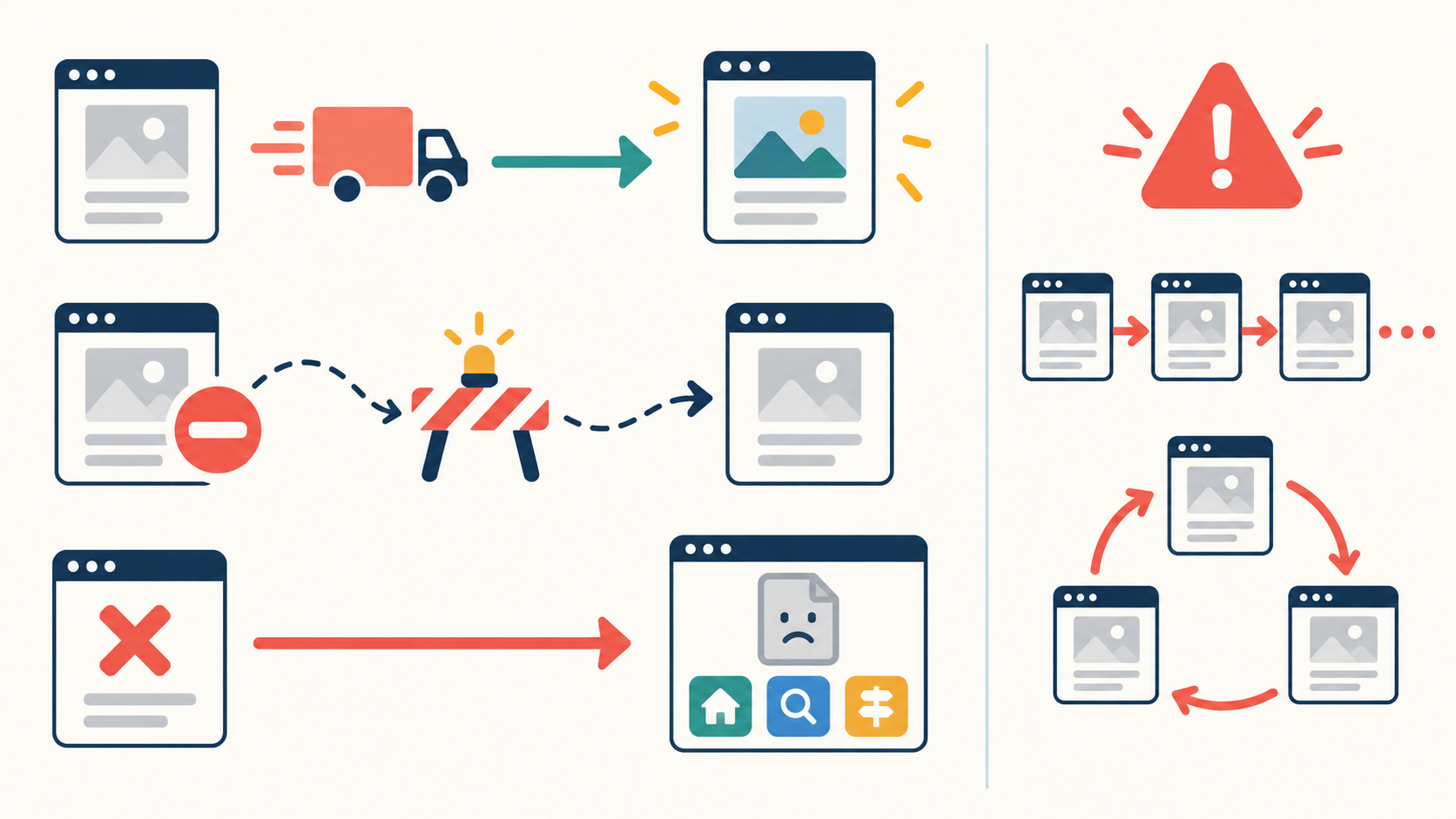
The response must still send a true 404 status, but its visible page can include clear navigation, a search option, popular sections, and a concise explanation. Keep it consistent with the site design. Do not disguise it as a successful page.
Broken Internal Links
A broken internal link points from one page on your site to a missing or incorrect destination. It creates avoidable friction because you control both ends of the link.
Fix the source link even if the old address redirects. Direct links are faster, clearer, and avoid unnecessary hops. Check menus, article links, image links, buttons, canonical tags, XML sitemaps, structured data, and templates.
The internal linking guide explains how crawlable, descriptive links support site structure.
What Is a 301 Redirect?
A 301 response means a resource has moved permanently. Browsers and crawlers are sent to the new address, and Google treats a permanent redirect as a strong signal that the destination should be canonical.
Use a 301 when:
- a page has permanently moved to a new URL;
- a slug or directory structure has changed;
- two overlapping pages have been intentionally merged;
- HTTP or a nonpreferred hostname must lead to the preferred HTTPS host; or
- a deleted page has a close, useful replacement satisfying the same intent.
Redirect the old URL directly to the closest equivalent destination. Update internal links and sitemaps afterward.
What Is a 302 Redirect?
A 302 response indicates a temporary move. Google generally follows it but treats it as a weaker signal that the target should replace the source. Use it when the original URL is expected to return, such as a temporary maintenance page or short-lived campaign routing.
If the move is permanent, use a permanent server-side redirect such as 301 or 308. Google’s official redirect documentation recommends permanent server-side redirects when a URL has permanently moved.
Moving or Renaming a URL Correctly
- Create or confirm the final replacement page.
- Make sure its content serves the old page’s intent.
- Add one direct permanent redirect from old to new.
- Update internal links to the new URL.
- Update the canonical to the new URL.
- Remove the old URL from the XML sitemap and add the new canonical URL.
- Test the old URL’s status and final destination.
- Inspect both URLs in Search Console when the page is important.
- Keep the redirect long enough for users, links, and search systems to adapt.
The SEO-friendly URL guide helps reduce unnecessary future changes.
Redirect Chains
A redirect chain occurs when one URL redirects to another redirect before reaching the final page:
Old URL → Intermediate URL → Final URLChains add latency, complicate maintenance, and increase the chance of failure. Googlebot generally follows several hops, but that is not a reason to build long chains. Update the original rule and internal links so they point directly to the final destination.
Redirect Loops
A loop sends requests in a circle. For example, page A redirects to page B while page B redirects to page A. Browsers eventually stop and display an error, and crawlers cannot reach content.
Loops often result from conflicting plugin, HTTPS, hostname, CDN, or server rules. Trace the complete response path, identify every system applying redirects, remove the conflict, and retest in a clean browser session.
What Is a Soft 404?
A soft 404 occurs when a URL returns a successful 200 status but the page looks like an error, is empty, or says the content is unavailable. The response claims success while the content says otherwise.
For a missing page with no replacement, return a real 404 or 410 status. If useful content exists, serve it normally. Do not return a thin “not found” message with 200, and do not redirect unrelated missing URLs to the homepage; Google may treat that behavior as a soft 404.
Deleted Pages: Redirect, 404, or 410?
Use a redirect when a close replacement exists
If a discontinued resource has been replaced by a page that satisfies the same need, redirect to that specific page. Explain important changes on the destination when useful.
Use 404 when the resource is simply unavailable
A normal 404 is correct for mistyped, unknown, or removed URLs without a relevant substitute.
Use 410 when removal is intentionally permanent
A 410 explicitly means gone. Google treats most 4xx responses similarly for indexing. Choose the status that best communicates the situation to other clients and your maintenance team.
When Not to Redirect
- Do not redirect every missing URL to the homepage.
- Do not send an old product to an unrelated category solely to avoid a 404.
- Do not redirect typo and spam URLs with no value.
- Do not redirect a removed page when no destination answers the same need.
- Do not create a redirect that leads into another redirect.
- Do not use a temporary redirect for a known permanent move.
- Do not redirect solely to manipulate search signals.
An irrelevant redirect confuses visitors and may be treated as a soft 404. Relevance matters more than eliminating every reported 404.
How to Find Broken URLs
Crawl the website
A reputable site crawler can follow internal links and report 4xx responses, redirect chains, loops, and links to redirected URLs. Crawl representative sections after template or migration changes.
Use Google Search Console
The Page Indexing report can show examples of not-found and soft-404 URLs known to Google. URL Inspection is better for investigating one important address. Not every listed 404 requires a fix; first decide whether the URL should exist.
See the Search Console beginner’s guide for an evidence-based workflow.
Review analytics and server logs
Analytics may reveal visitor landings on a custom 404 page, while server logs show actual status responses and request sources. Protect personal data and retain only what is necessary.
Check external backlinks
If a missing URL has useful external links and a close replacement, a redirect can preserve a helpful path for visitors. If no equivalent exists, consider restoring a valuable resource rather than redirecting it somewhere unrelated.
How to Fix Internal Links
- Export or list broken internal source-and-destination pairs.
- Confirm whether each destination moved, was deleted, or contains a typo.
- Replace the link with the final URL when a relevant page exists.
- Remove the link when it no longer helps.
- Restore the page when it was removed accidentally.
- Add a permanent redirect only when an old URL has a true replacement.
- Re-crawl the affected section and test navigation manually.
Do not rely on a redirect as a permanent substitute for correcting links you control.
Practical Redirect Checklist
- The old and new URLs serve the same or closely matching intent.
- The redirect type matches whether the move is permanent or temporary.
- A server-side redirect is used where practical.
- The old URL reaches the final destination in one hop.
- The destination returns a successful response.
- No redirect chain or loop exists.
- Internal links point directly to the final URL.
- Canonical tags reference the final canonical page.
- The XML sitemap contains the final URL, not the redirect source.
- Structured data and alternate-language links are updated.
- Important external links are considered.
- Representative desktop and mobile journeys are tested.
- Search Console is monitored after major changes.
Include these checks in a broader SEO audit. The canonical URL guide explains how permanent redirects and canonical signals work together.
Common 404 and Redirect Mistakes
- Redirecting everything to the homepage: Unrelated destinations are unhelpful.
- Leaving broken internal links: Fix links at their source.
- Creating chains during repeated migrations: Point old URLs directly to the current page.
- Using 302 for a permanent change: Match the status to the intent.
- Returning 200 for missing pages: This creates soft-404 confusion.
- Redirecting to a page that also errors: Test the final response.
- Forgetting assets and canonicals: Update all references, not only navigation.
- Deleting redirect rules too quickly: Old links and bookmarks may remain in use.
- Installing overlapping redirect systems: Conflicts can cause loops.
- Treating every Search Console 404 as urgent: Fix only URLs that should exist or have a relevant replacement.
Frequently Asked Questions
Are 404 errors bad for SEO?
Expected 404s are normal and do not automatically harm an entire site. Broken links to important content and accidental removals should be repaired, but nonexistent URLs without replacements can correctly remain 404.
Should I redirect all 404 pages?
No. Redirect only when a close replacement exists. Otherwise return a true 404 or 410 with a helpful visible page.
Is 301 always better than 302?
No. A 301 suits a permanent move; a 302 suits a temporary one. The correct choice communicates your actual intent.
How many redirect hops are acceptable?
Avoid chains and use one direct hop whenever possible. Although crawlers may follow multiple redirects, each extra step adds delay and another failure point.
Fix the User Journey, Not Just the Error Report
The best response to a broken URL depends on what happened. Restore an accidentally removed page, redirect a permanently moved resource to its closest replacement, use a temporary redirect for a genuine temporary situation, and return 404 or 410 when nothing relevant remains.
Then repair internal links and technical references so they point directly to the final page. This keeps navigation clear, reduces unnecessary redirect hops, and gives search engines consistent signals without inventing replacements that do not help visitors.