
Internal links connect one page on your website to another page on the same site. They help visitors continue learning, help search crawlers discover URLs, and show how related pages fit together.
This beginner guide explains which pages to link, how to write anchor text, where links belong, and how to audit a site without chasing a magical number. The goal is a useful path through your content—not a web of links added only for search engines.
What Is an Internal Link?
An internal link points to another URL on the same website. A navigation link from the home page to the blog is internal, and so is a contextual link from an article about keywords to a guide about on-page SEO.
An external link points to a different website. Backlinks are external links other websites create to yours. Each type has a different purpose, but all should help a visitor understand or reach something relevant.
For the wider foundation, see What Is SEO? A Beginner’s Guide.
Why Internal Linking Matters
It helps people find the next useful page
A good internal link answers the natural next question. Someone learning about search intent may benefit from a keyword research tutorial; someone fixing page titles may need a full on-page checklist.
It helps crawlers discover pages
Search crawlers follow links to find content. Google’s link guidance recommends ordinary crawlable links—typically an <a> element with an href. Important pages should have at least one link from another page on the site.
It provides context and structure
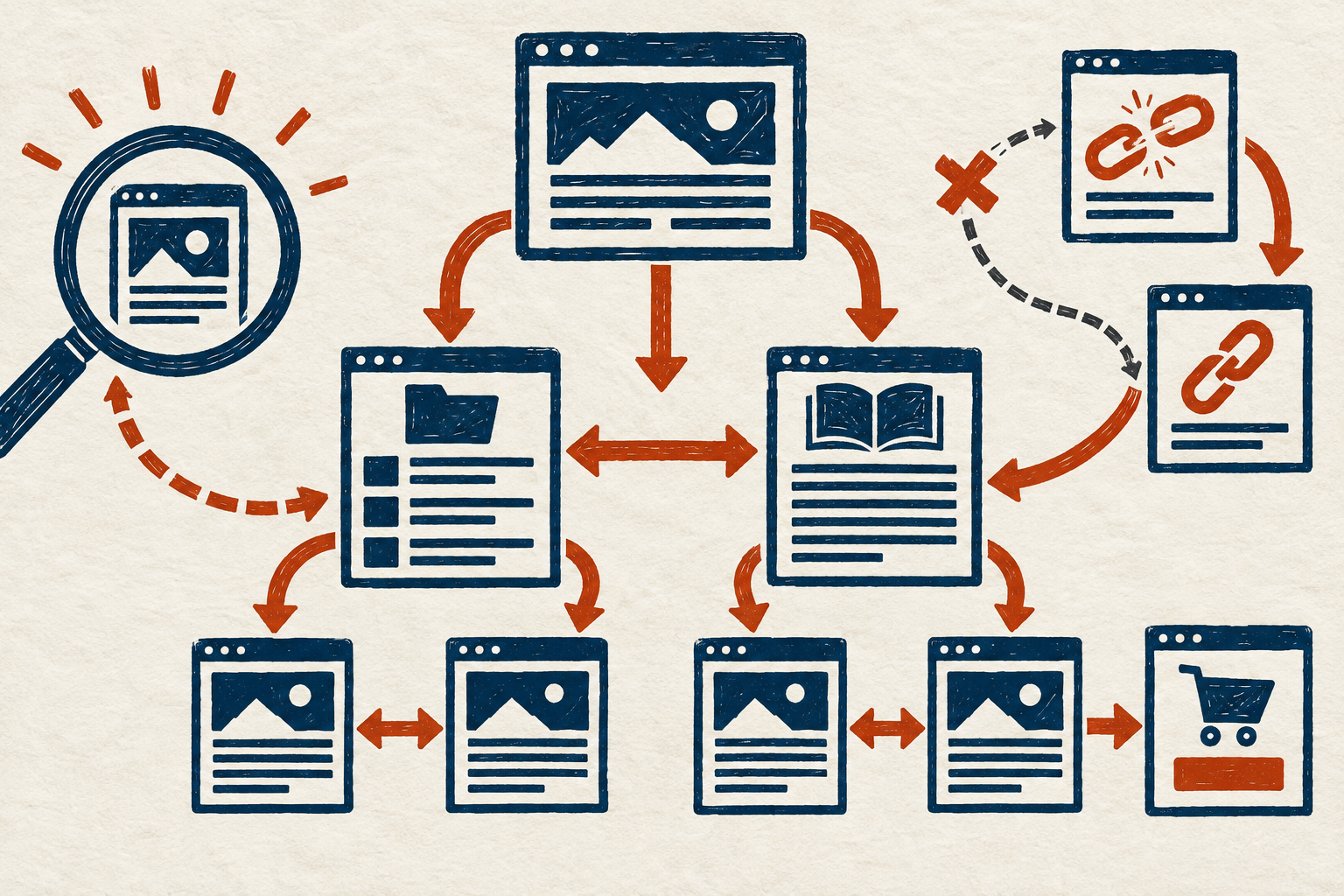
Descriptive links and a logical hierarchy help people and systems understand relationships. A central beginner SEO guide can link to detailed pages about keywords, content, images, and technical checks. Those detailed pages can link back to the hub when it helps.
Internal links are not a ranking guarantee. Their practical value comes from discovery, navigation, context, and a coherent site.
Plan a Simple Site Structure
Imagine the site as a library. Broad category pages are shelves; detailed articles are books. Visitors should be able to reach important material through sensible paths rather than guessing an exact URL.
Use topic hubs and supporting pages
A hub introduces a broad subject and links to focused guides. Supporting pages answer narrower questions and link to relevant siblings or the hub. This structure should reflect genuine reader needs, not artificial clusters created merely to insert keywords.
Keep important pages within reasonable reach
There is no universal click-depth rule that fits every site. However, burying a valuable page behind many layers makes it harder to discover and use. Link prominent evergreen pages from suitable menus, category pages, hubs, or related articles.
Watch for orphan pages
An orphan page has no discoverable internal link pointing to it. It may exist in a sitemap or analytics report but remain disconnected from the browsing experience. If the page is valuable, connect it from a relevant location. If it is not valuable, decide whether to improve, consolidate, redirect, or remove it.
Choose Pages Worth Linking
Link when the destination:
- defines a term the current page cannot explain fully;
- provides a necessary next step or deeper tutorial;
- supports a claim or example;
- helps compare related approaches;
- answers a likely follow-up question; or
- moves the reader toward an appropriate service, resource, or conversion.
For example, a brief reference to selecting a target query can naturally point to the keyword research guide for beginners. The link is useful because the destination expands the exact task.
Write Descriptive Anchor Text
Anchor text is the clickable wording of a link. It should tell the reader what to expect.
- Weak: “Click here.”
- Better: “Read the on-page SEO checklist.”
- Weak: “Learn more.”
- Better: “Compare crawlability and indexability.”
Keep it concise and natural. Do not stuff exact-match keywords into every link. Repeated, awkward anchors reduce readability and can look manipulative. Surrounding sentences also provide context, so the clickable phrase does not need to contain every detail.
If an image is the link, its ALT text can help describe the destination. Do not leave a linked informative image without a meaningful accessible name.
Place Links Where They Help
Contextual links within the main content are useful when they appear near the idea they expand. Navigation, breadcrumbs, category pages, related-post sections, and footers can also support discovery, but they serve different browsing needs.
Avoid crowded sentences
Several links in one short sentence force the reader to choose before understanding the point. Space links where each destination has a clear reason to exist.
Link to the canonical destination
Use the final preferred HTTPS URL instead of a redirecting or duplicate version. This reduces unnecessary hops and keeps signals consistent. The technical SEO guide explains canonicals, redirects, and clean URLs.
Keep links crawlable
A normal HTML link with a valid href is the safest choice. Buttons that only run scripts, elements with no destination, and links hidden behind interactions may not provide the same dependable discovery path.
How Many Internal Links Should a Page Have?
There is no ideal number for every article. A long guide may justify more links than a short answer. Add a link when the destination assists the reader, and stop when extra links create noise.
Review balance across the site. A new page with zero incoming links needs attention; a page receiving hundreds of templated links may not need more. Decisions should reflect importance, relevance, and usability rather than a quota.
A Practical Internal Linking Workflow
- Choose the page to improve. Define its purpose and audience.
- List related pages. Search your site, categories, or content inventory.
- Select useful destinations. Prefer pages that answer a real next question.
- Add contextual outgoing links. Place each near the relevant idea.
- Find incoming-link opportunities. Update older relevant pages to point to the new or important page.
- Use descriptive anchors. Vary wording naturally when context differs.
- Check the destination. Link directly to a live canonical URL.
- Test every link. Confirm it opens the intended page on desktop and mobile.
- Re-audit periodically. Catch broken links, redirects, and orphan pages after site changes.
How to Audit Internal Links
Start with a content inventory
Export or list indexable posts, pages, and categories. Note each URL’s topic, status, and preferred destination. Search Console, analytics, your CMS, and a reputable crawler can provide different parts of the picture.
Find isolated or weakly connected pages
Identify pages with no internal links or very few useful incoming links. Verify manually: a tool may miss links rendered in unusual ways, and a sitemap entry is not the same as a navigational link.
Check broken and redirected links
Update internal links that return errors. When a link passes through a redirect, change it to the final relevant destination where practical. Do not redirect unrelated broken pages to the home page.
Review anchors and relevance
Scan for vague wording, misleading anchors, forced keyword repetition, and links placed in unrelated sections. Keep the links that genuinely make the page easier to use.
Internal Linking Checklist
- Every important indexable page has at least one relevant incoming internal link.
- Hubs and category pages connect readers to useful detail pages.
- New articles link to established resources where appropriate.
- Older relevant articles link to valuable new content.
- Anchor text describes the destination naturally.
- Links use the preferred HTTPS and canonical URL.
- No internal link leads to an accidental 404 or redirect chain.
- Linked images have suitable ALT text.
- Links are visually recognizable and keyboard usable.
- The page remains readable on a narrow screen.
Common Internal Linking Mistakes
- Using “click here” everywhere: The destination is unclear out of context.
- Forcing exact-match anchors: Repetition damages natural writing.
- Linking every occurrence: One useful link may be enough.
- Creating orphan pages: A sitemap alone does not build a browsing path.
- Pointing to redirects: Link directly to the final preferred URL.
- Automating without review: Keyword-based plugins can create irrelevant or excessive links.
- Ignoring mobile usability: Closely packed links are difficult to tap.
- Removing pages without updating links: Old references become dead ends.
Frequently Asked Questions
Do internal links guarantee higher rankings?
No. They support discovery, navigation, and context, but rankings depend on many systems and there is no guaranteed outcome.
Should every page link back to the home page?
Most themes already provide a logo or navigation path to the home page. Contextual content links should focus on the most useful destination rather than repeating a home-page link unnecessarily.
Should links open in a new tab?
Internal links generally work well in the same tab because visitors expect normal site navigation. If you deliberately open a new tab, communicate that behavior when it may surprise users.
Can I use the same anchor text more than once?
Yes when the wording naturally describes the same destination. You do not need artificial variation, but you should avoid mechanically inserting an exact phrase across many unrelated pages.
Build Paths for People First
A strong internal linking system feels natural: readers can move from a broad explanation to a specific task, important pages are not isolated, and each anchor accurately previews its destination.
Begin with your most useful pages, connect them through relevant context, and test the paths. A small number of purposeful links is more valuable than a large number added without a reader in mind.