
Good study materials do more than shorten a chapter. They separate essential ideas from supporting detail, turn facts into questions, and help you practise recalling information without looking at the answer. AI can speed up that preparation, but only if you review what it creates.
This guide compares six current AI tools for study notes and flashcards in 2026. You will learn what each tool does, where it fits best, what its free access includes, and which limitations matter before you upload class material. You will also get a practical workflow for turning rough notes into an accurate, useful review system.
Quick Comparison: Which Tool Fits Your Study Style?
| Tool | Best for | Notes and flashcards | Free-access position |
|---|---|---|---|
| Gemini Notebook | Studying from a defined set of sources | Grounded summaries, citations, flashcards, and quizzes | Standard access is available without a paid AI plan, with usage limits |
| Quizlet | A familiar flashcard and practice ecosystem | Turns notes and files into editable sets and study guides | Manual flashcards and some AI use are free; advanced use is limited |
| Knowt | Free manual decks plus several study modes | Unlimited notes and flashcards; limited AI summarization | Free plan includes unlimited user-created sets; AI summaries are limited |
| RemNote | Connecting notes directly to spaced review | Linked notes, flashcards, PDF learning, and AI card generation | Free notes and cards plus a monthly AI-credit allowance |
| ChatGPT Study | Guided explanation and custom practice | Works with notes or files and can create flashcard-style review | Available across ChatGPT plans; normal plan and upload limits apply |
| Microsoft Study and Learn | Students using an eligible school Microsoft account | Source-grounded guidance, flashcards, quizzes, and remediation | Access depends on school licensing, age, and administrator settings |
The table is a starting point, not a ranking. A source-grounded notebook may be best for a research-heavy class, while a dedicated flashcard platform may be better for vocabulary, anatomy, formulas, or certification study.
1. Gemini Notebook: Best for Source-Grounded Study Packs
Gemini Notebook is built around sources you add, such as PDFs, websites, Google documents, slides, audio, and copied text. Its chat can answer from the selected notebook sources and provide inline citations back to the material. The Studio can turn those sources into study guides, flashcards, quizzes, mind maps, and other formats.
Best use for students
Use it when your teacher has given you a clear bundle of readings or slides and you want one place to question, summarize, and review them. The citations are especially helpful because you can return to the relevant passage instead of trusting a detached summary.
How it helps with notes and flashcards
You can request a focused summary of a specific source, then generate flashcards or a quiz from the same notebook. Current flashcard controls include difficulty choices, explanations, progress tracking, review of missed cards, shuffling, and CSV download.
Free access and limitations
Google currently offers standard access without a paid AI plan. Its official help lists up to 50 sources per notebook for free users, while a newer compute-based quota can limit usage and refresh during the week. Limits may change, mobile features can differ from the browser, and a school-managed account may require administrator approval. A citation also does not guarantee that the AI interpreted the passage correctly, so open it and read the context.
2. Quizlet: Best All-Round Flashcard Platform
Quizlet’s AI study tools can turn typed notes, PDFs, slides, and photographed handwritten notes into flashcards, outlines, study guides, and practice tests. Generated flashcard sets remain editable, which matters because the first draft often needs clearer wording or corrected details.
Best use for students
Quizlet suits students who want to move quickly from a deck into several kinds of practice. It is particularly convenient for terms and definitions, language learning, processes, short explanations, and courses where an existing Quizlet workflow is already familiar.
How it helps with notes and flashcards
Smart Assist can build a draft set from pasted notes or an uploaded document. A generated study guide can include an outline and flashcards, and the resulting cards can be reorganized or edited before study.
Free access and limitations
Quizlet says students can start for free and use some AI features without a subscription. Its help center describes free study-guide generation as limited, while advanced capabilities are part of Quizlet Plus. Availability can vary by feature, language, age, region, and device. Do not assume a public set is accurate merely because many people use it; compare it with your course material.
3. Knowt: Best for Free Manual Sets and Multiple Study Modes
Knowt’s student free plan includes unlimited user-created flashcard sets and notes, plus study modes such as Learn, Practice Test, Spaced Repetition, Match, and Flashcards on your own sets. Its AI summarizers can work with formats including PDFs, images, video, PowerPoint, and live recordings.
Best use for students
Knowt is a practical option if you want to build and keep many decks without paying, while using AI only occasionally to process a difficult file or lecture. The range of study modes lets the same material support quick review and more structured practice.
How it helps with notes and flashcards
You can maintain notes and flashcards in the same study environment, then practise them with different modes. AI summarization is useful for creating a first-pass study resource, but you should edit that output into concise, testable cards.
Free access and limitations
Knowt’s current official help says the free plan allows unlimited notes and flashcard sets but limits AI summarizers to one summary per month. Other AI or exam features have separate limits or require Knowt Ultra. Because the company can update these allowances, check the plan screen in your account before relying on a feature for an entire term.
4. RemNote: Best for Linking Notes to Spaced Review
RemNote combines a structured note system with flashcards and spaced repetition. Instead of keeping lecture notes in one app and a disconnected deck in another, you can create cards within the notes that explain them. Its AI tools can generate cards or quizzes from text, PDFs, and presentations.
Best use for students
RemNote fits long courses where ideas build on one another, such as medicine, biology, law, languages, or technical subjects. It is most useful for students willing to maintain an organized knowledge base rather than generate a deck once and forget the source.
How it helps with notes and flashcards
Highlight or write an important concept, turn it into a question, and schedule it for review. AI can propose cards from supplied content, but the strongest cards still need your judgment: one idea per card, enough context to avoid ambiguity, and an answer you have checked.
Free access and limitations
RemNote currently lists unlimited notes and flashcards on its free plan, along with 250 AI credits per month. AI use consumes credits according to the amount of content processed, and advanced PDF, quiz, transcription, and AI-tutor use is more limited. RemNote also states that AI features send some note content to external AI providers for processing, so avoid sensitive material and review its current privacy controls.
5. ChatGPT Study: Best for Custom Explanations and Practice
ChatGPT Study mode is designed to work through a topic interactively. You can provide your level, goal, test date, and course materials, then ask for explanations, questions, a study plan, or flashcard-style review.
Best use for students
Choose it when you want a flexible tutor-like conversation rather than a permanent flashcard library. It can ask one question at a time, adjust difficulty, explain mistakes, or help divide a set of notes into manageable review sessions.
How it helps with notes and flashcards
Upload or paste a specific section, ask the system to identify the central concepts, and request questions that require both recall and explanation. You can also ask it to delay answers until you respond, which makes the session active rather than passive.
Free access and limitations
OpenAI says Study mode is available across ChatGPT plans, but it follows the message, model, and rate limits of the user’s plan. File and image uploads have their own availability and limits. Study mode can make mistakes and may sometimes give a direct answer instead of guiding you, so specify the behaviour you want and check every generated answer against your notes.
6. Microsoft Study and Learn: Best for Eligible School Accounts
Microsoft’s Study and Learn Agent provides scaffolded learning conversations and can use uploaded documents, slides, and PDFs as context. It can generate flashcards, quizzes, matching activities, and fill-in-the-blank practice, then provide explanations or remediation for missed items.
Best use for students
It is a strong fit when your institution already provides an eligible Microsoft 365 Education account and has enabled the experience. Its guided approach encourages the student to answer rather than simply presenting finished work.
How it helps with notes and flashcards
Cards can be generated from uploaded materials or a topic. The system can offer hints, explain missed answers, and let you repeat the items that need more work. Citations in source-grounded conversations help you compare the generated material with what you uploaded.
Free access and limitations
Access is tied to eligible Microsoft 365 Education licensing and institutional controls rather than a general consumer free plan. Current Microsoft documentation says higher-education students aged 13 or older may be eligible; in K–12 environments, administrators must configure student access, and students under 13 cannot use Copilot Chat. Availability also depends on the platform and the school’s agent policies.
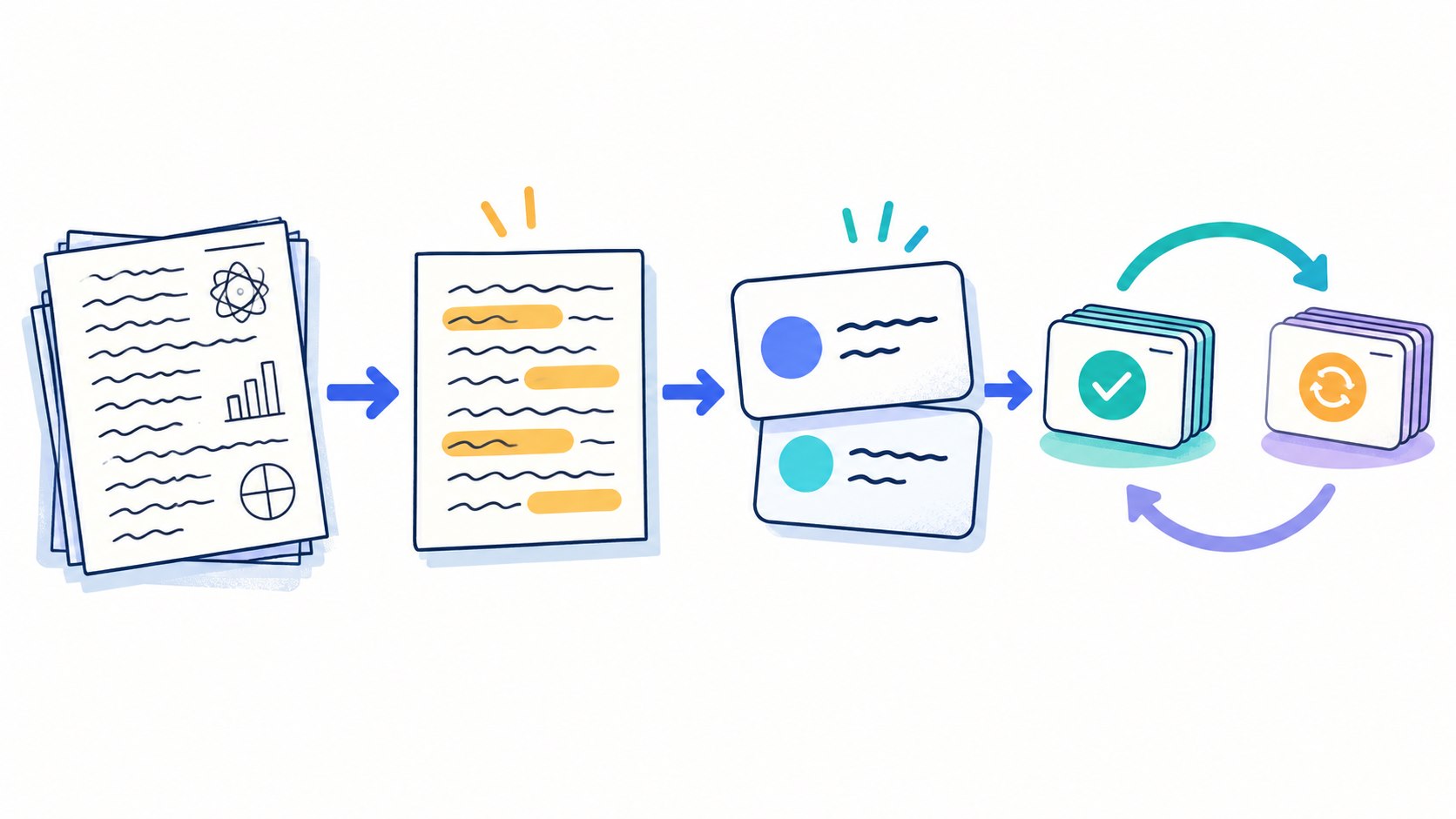
How to Turn Class Notes into Useful Study Material
Step 1: Clean the source before using AI
Remove unrelated comments, repeated lines, and personal information. Add missing headings and correct obvious transcription errors. If a lecture recording is permitted, compare its transcript with your own notes and the teacher’s slides.
Step 2: Ask for a structured summary
Tell the tool to use only your supplied material and to label anything unclear instead of guessing.
Prompt: Using only the notes below, organize the material into main ideas, supporting details, key terms, and examples. Write “unclear in the notes” when information is missing. Preserve qualifications and do not add outside facts.
Step 3: Check the summary against the original
Compare every name, date, formula, definition, and cause-and-effect claim. Restore exceptions that the summary removed. If the notes came from several sources, make sure the AI has not blended two different explanations into one.
Step 4: Generate small, testable cards
A useful card asks one clear question. Avoid cards whose answers are entire paragraphs or vague lists.
Prompt: Create 20 flashcards from the verified summary. Put one idea on each card. Mix definitions, comparisons, process steps, and short application questions. Keep answers concise, include enough context to avoid ambiguity, and flag any card that depends on missing information.
Step 5: Edit before importing
Delete duplicates, split overloaded cards, correct wording, and add source or page references where helpful. If a card seems too easy because the question reveals the answer, rewrite it.
Step 6: Review actively
Try to answer before revealing the back. Mark uncertain cards for earlier review. Ask yourself to explain why an answer is correct, connect it to another concept, or apply it to a new example. Generating cards is preparation; retrieving the answer is the study.
Step 7: Update the deck
After a class, tutorial, or practice test, fix cards that caused confusion. Retire material you already know and add cards for errors that reveal a genuine knowledge gap.
Why You Must Check AI Summaries and Flashcards
AI can omit a condition, reverse a relationship, simplify a debate, or turn a tentative claim into a certainty. A flashcard repeats that mistake every time you review it, making an error feel familiar.
- Check generated content against the original notes, textbook, slides, or official source.
- Verify quotations, formulas, units, dates, names, and technical terms character by character.
- Keep page numbers or source links when a fact may need context.
- Ask your teacher when course terminology differs from a general explanation.
- Never use an AI-generated reference unless you have opened and verified the real source.
For additional options, see Sensaiteach’s published overview of AI tools for students in 2026.
Privacy and Academic-Integrity Rules
Do not upload passwords, student identification numbers, grades, medical details, private messages, identifiable information about classmates, confidential research, active test questions, or copyrighted material you are not allowed to share. Remove unnecessary names and metadata before uploading a file.
Check your course policy before using AI on assessed work. Creating private review questions from your own notes may be allowed where generated answers or unauthorized collaboration are not. Do not upload a teacher’s restricted exam bank or share a deck containing confidential assessment material. If disclosure is required, keep a short record of the tool, purpose, prompts, and edits you made.
Practical Tips for Better AI Flashcards
- Use your course language. Match the definitions and symbols your teacher expects.
- Ask for variety. Include recall, comparison, sequence, and application—not only definitions.
- Keep answers short. Split a card if it tests several independent facts.
- Add context. “What is its function?” is weak if the deck contains several possible subjects.
- Include plausible contrasts. Ask how two similar ideas differ to expose confusion.
- Review in small sessions. A carefully edited deck of 30 cards is usually more useful than 300 unchecked cards.
Common Mistakes to Avoid
- Uploading rough notes and accepting every generated card without review.
- Making cards so long that studying becomes rereading.
- Memorizing isolated facts without examples, relationships, or application.
- Choosing a tool only because it generates the largest deck.
- Ignoring plan limits until the night before an exam.
- Keeping sensitive information in a consumer AI account.
- Spending more time formatting a system than practising retrieval.
Frequently Asked Questions
Which AI flashcard tool is best for free use?
It depends on the job. Knowt currently offers unlimited manually created notes and sets with multiple study modes, while Gemini Notebook provides standard source-grounded access with quotas. RemNote offers unlimited notes and flashcards plus a limited monthly AI allowance. Check current account limits before committing your course material.
Can AI make flashcards from handwritten notes?
Some tools accept note photos or scanned files, including Quizlet. Recognition quality depends on handwriting, lighting, and page layout. Check every technical term and symbol because small recognition errors can create incorrect cards.
How many flashcards should AI generate?
Ask for enough cards to cover the learning objectives, then edit. There is no ideal universal number. Stop when each important idea is tested clearly without duplicates or trivial detail.
Are AI summaries safe to study from?
Only after comparison with the original material. Use a summary as a map, not as the authority. If a detail matters for an exam or assignment, confirm it in the source your course recognizes.
Choose a Tool That Helps You Practise, Not Just Generate
The best AI tool for study notes and flashcards is the one that fits your source material, privacy needs, school rules, and review habits. Gemini Notebook is strong for source-grounded study packs; Quizlet offers a broad flashcard ecosystem; Knowt supports extensive free manual study; RemNote links knowledge management with spaced review; ChatGPT Study offers flexible guided practice; and Microsoft Study and Learn fits eligible school accounts.
Whichever tool you choose, the winning routine is the same: start with trustworthy notes, generate a manageable first draft, check it carefully, edit every card, and practise retrieving the answers. AI saves preparation time only when you keep responsibility for accuracy and learning.