
Search engine optimization, usually shortened to SEO, is the process of helping search engines understand a website and helping the right people discover it through search. Good SEO also makes a page clearer, faster, and easier for visitors to use.
SEO is not a secret formula or a way to guarantee first place. Search engines evaluate many signals, competition changes, and not every published page will be indexed. The sensible goal is to create genuinely useful pages, make them technically accessible, and describe them clearly enough for people and search systems to understand.
This beginner’s guide explains how search works, the main types of SEO, and a practical checklist you can apply without stuffing pages with keywords or chasing every new tactic.
What Does SEO Mean?
SEO stands for search engine optimization. It covers improvements that can increase a website’s visibility in unpaid—or organic—search results. Organic results are different from advertisements: a site owner does not pay the search engine for each organic visit.
Imagine you publish a page that teaches students how to make study notes. SEO helps in several ways:
- The page uses a clear title that describes the lesson.
- The content answers the questions a beginner is likely to have.
- Related pages link to it with understandable anchor text.
- The site loads well on a phone and does not hide important content.
- Search crawlers are allowed to access the page.
Those improvements help both readers and search engines. That overlap is the foundation of sustainable SEO.
How Search Engines Work in Simple Terms
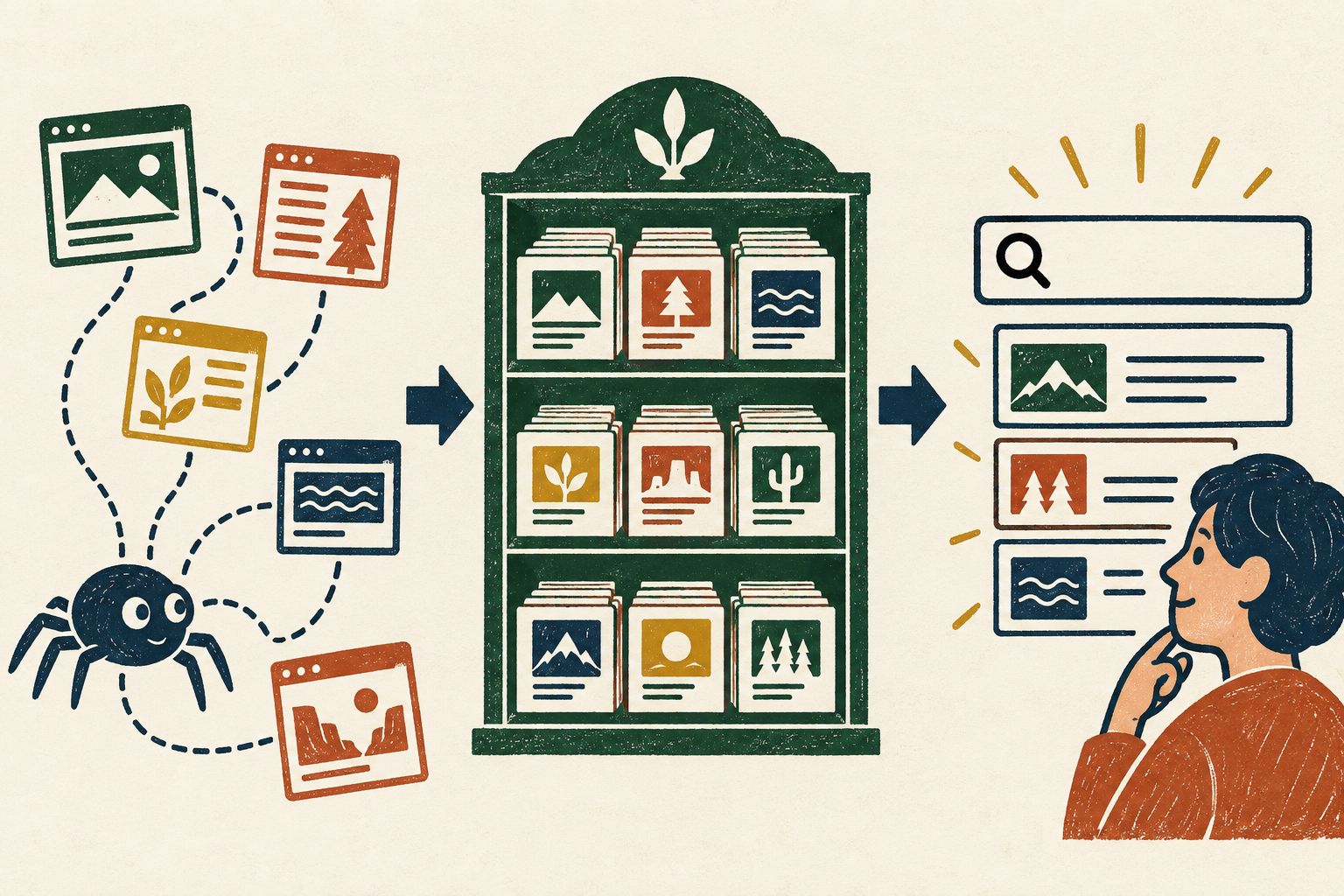
Google describes three broad stages: crawling, indexing, and serving search results. Other search engines use comparable processes, although their systems and indexes are independent.
1. Crawling: discovering pages
Automated programs commonly called crawlers follow links and discover new or updated URLs. A crawler can reach a page through an internal link, an external link, or a sitemap. A page that has no links pointing to it is harder to discover.
2. Indexing: understanding and storing information
After finding a page, a search engine may analyze its text, images, video, headings, links, and other information. It then decides whether and how to store the page in its index. An index is a large organized collection of information about web pages. Crawling does not guarantee indexing.
3. Serving: matching results to a search
When someone searches, the engine tries to return useful and relevant results. The order can depend on the query, page content, quality signals, location, language, device, and many other systems. Following best practices can improve eligibility and understanding, but it cannot guarantee a particular position.
Google’s official guide to how Search works explains these stages and notes that even technically compliant pages are not guaranteed to be crawled, indexed, or served.
The Three Main Areas of SEO
On-page SEO
On-page SEO concerns the content and HTML elements on an individual page. It includes a descriptive title, a logical heading structure, useful body content, relevant images, helpful internal links, and a concise page description.
For example, a page about cleaning a laptop keyboard should explain the safe process, required materials, important warnings, and common mistakes. Repeating “clean laptop keyboard” in every paragraph would not make the instructions more useful.
Off-page SEO
Off-page SEO involves signals and activity beyond the page itself. The best-known example is earning links from other websites. A link can help people discover a resource and may help search engines understand its reputation and context.
Quality matters more than collecting random links. A genuine link from a relevant publication, school resource, professional organization, or useful discussion is more meaningful than links placed on unrelated sites solely to influence rankings. Buying manipulative links or joining link schemes can violate search engine spam policies.
Technical SEO
Technical SEO helps search engines access, render, and understand a site. It includes crawl controls, indexing directives, canonical URLs, redirects, structured data where appropriate, secure HTTPS delivery, mobile usability, page performance, and valid site architecture.
You do not need to become a developer before publishing. A well-maintained WordPress theme and sensible settings handle many basics. Still, beginners should know that an excellent article cannot perform in search if it is accidentally blocked, returns an error, or works poorly on common devices.
Keywords and Search Intent
A keyword is a word or phrase someone types or speaks when searching. Keyword research means learning the language people use and the questions behind it. The aim is not to repeat one phrase as often as possible; it is to understand the reader’s need.
Understand the intent behind the words
Search intent is the goal behind a query. Someone searching “what is SEO” probably wants a beginner explanation. Someone searching “SEO audit service” may be comparing providers. Someone searching a product name plus “login” wants a particular destination.
A page succeeds when its format matches that goal. A definition query needs a direct explanation. A how-to query benefits from ordered steps. A comparison query needs meaningful criteria and differences.
Use natural language
Place the main topic naturally in the page title, introduction, a useful heading, and relevant body text. Include related terms when they help explain the subject. Synonyms and examples usually appear naturally when a page covers a topic thoroughly.
Do not force awkward variations into every sentence. Keyword stuffing makes writing difficult to read and can look like an attempt to manipulate search systems.
Helpful Content Comes First
SEO works best when it supports content made for people. Google recommends helpful, reliable, people-first content rather than pages created mainly to attract search traffic. A useful page answers the main question, provides enough context to act, and makes its sources and limitations clear.
Before publishing, ask:
- Does this page solve the problem promised by its title?
- Is the information original, accurate, and complete enough for the audience?
- Would a reader understand who created or reviewed it?
- Are important claims supported by reliable sources?
- Does the reader need to search again because a key step is missing?
- Is the page easy to scan without becoming shallow?
The official guidance on people-first content also makes clear that Google has no preferred word count. Write enough to satisfy the reader, not enough to reach an invented target.
Internal Links Help Readers and Crawlers
An internal link connects one page on your site to another. It can guide a visitor to background information, a detailed tutorial, or a logical next step. It also gives crawlers paths through the site and helps communicate how pages relate.
Use descriptive anchor text. “Read our beginner guide to study planning” gives more context than “click here.” Add links where they help the reader; do not insert dozens of unrelated links into every article.
A simple site structure might have a broad SEO guide linking to separate articles about keyword research, title tags, internal links, and technical audits. Those focused articles can link back to the main guide and to one another when the relationship is useful.
Images, Filenames, and ALT Text
Images can explain a process, demonstrate a result, or make a long article easier to follow. Give each meaningful image a short descriptive filename and alternative text that communicates its purpose in context.
ALT text helps people who use screen readers and can help search engines understand an image. Describe what matters rather than listing keywords. For a diagram, “Three-stage search process showing crawling, indexing, and results” is useful. “SEO search engine ranking optimization best SEO” is not.
Decorative images may use empty alternative text when appropriate. Compress large files, use supported formats, and let WordPress generate responsive image sizes. Google’s image SEO guidance recommends standard HTML image elements, descriptive context, and responsive image techniques.
Mobile-Friendly Websites and Website Speed
Design for different screens
A responsive page adapts to desktop, tablet, and mobile screens. Text should remain readable, navigation should be usable, buttons should be easy to tap, and images or tables should not extend beyond the viewport. Important content should not disappear on mobile.
Test real pages rather than assuming a responsive theme solves every problem. Long titles, wide tables, embedded media, pop-ups, and oversized images can still cause trouble.
Make pages reasonably fast
Slow pages frustrate visitors and can prevent them from reaching the content. Common improvements include resizing and compressing images, avoiding unnecessary scripts, using effective caching, and choosing reliable hosting.
Speed is one part of an overall page experience, not a shortcut to rankings. Use tools such as PageSpeed Insights and your real-user data to find specific problems. Fix issues that improve the experience instead of chasing a perfect score without context.
Why SEO Takes Time
Search engines need time to discover and process changes. Google’s SEO Starter Guide says some changes may appear within hours while others can take several months. The effect also depends on the site, topic, competition, quality, and type of change.
New pages may need to be crawled and indexed. Existing pages may be reassessed. Other sites continue publishing and improving. Search behavior and result layouts also change. For these reasons, no responsible SEO can promise a specific ranking by a specific date.
Measure progress with appropriate signals: whether important pages are indexable, impressions for relevant searches, useful clicks, engagement, and meaningful outcomes such as sign-ups or completed inquiries. Avoid judging an entire strategy from one keyword after a few days.
A Practical Beginner SEO Checklist
Before writing
- Choose one clear audience and problem.
- Review the search results to understand likely intent and useful formats.
- Gather reliable sources and first-hand examples.
- Decide what your page can add instead of copying existing summaries.
While writing
- Use a descriptive, honest page title and one clear H1.
- Answer the main question near the beginning.
- Organize sections with logical H2 and H3 headings.
- Use the main topic and related language naturally.
- Add examples, steps, or definitions where they improve understanding.
- Link to relevant internal pages with descriptive anchor text.
- Cite trustworthy external sources for claims that need support.
Before publishing
- Write a concise excerpt or meta-description-style summary.
- Check spelling, grammar, facts, and repeated ideas.
- Add descriptive ALT text to meaningful images.
- Preview the page on desktop, tablet, and mobile.
- Check that images, lists, tables, and embeds do not overflow.
- Confirm the page is not accidentally set to noindex or blocked.
- Test important links and the page’s HTTPS URL.
After publishing
- Make sure the page appears in the sitemap or is linked from an indexable page.
- Use Search Console or the relevant search engine tools to monitor discovery and indexing.
- Review performance over a sensible period rather than expecting immediate results.
- Update the page when information changes or readers need clearer guidance.
Common SEO Mistakes
- Writing for an algorithm instead of a reader: Pages become repetitive and fail to solve the actual problem.
- Keyword stuffing: Repeating phrases unnaturally damages clarity and can look spammy.
- Publishing thin variations: Many near-duplicate pages rarely help users more than one complete resource.
- Ignoring search intent: A sales page is a poor answer when the reader wants a definition or tutorial.
- Copying competitors: A rewritten version adds little reason for readers—or search systems—to prefer it.
- Using vague titles: Clever wording can hide what the page actually offers.
- Buying or exchanging manipulative links: Link schemes can violate spam policies.
- Forgetting mobile users: Overflowing content and intrusive pop-ups can make a page unusable.
- Ignoring technical access: A noindex rule, broken redirect, or server error can keep useful content out of results.
- Expecting instant rankings: SEO requires observation, improvement, and patience; there is no guaranteed schedule.
Frequently Asked Questions
Is SEO free?
Organic search clicks do not have a per-click advertising charge, but SEO still requires time, content, maintenance, and sometimes paid tools or professional help. Beginners can complete many fundamentals using their website platform and free search engine tools.
Do I need to submit every page to Google?
Usually not. Search crawlers can discover pages through links and sitemaps. Search Console’s URL Inspection tool can be useful for checking an important page, but requesting indexing does not guarantee inclusion or ranking.
How many keywords should one page target?
Start with one main topic and the related questions needed to satisfy its intent. There is no universal number. One complete page can naturally cover several related phrases without assigning a rigid keyword quota.
Are backlinks still part of SEO?
Links can help people and crawlers discover content and can provide contextual signals. Focus on earning relevant links through genuinely useful work. Avoid buying links or creating schemes intended to manipulate rankings.
Can AI-generated content rank?
The production method alone is not a guarantee or automatic disqualification. Content should be accurate, original, helpful, and created primarily for people. Using automation mainly to manipulate rankings can violate spam policies. Human review, clear responsibility, and reliable sourcing remain important.
Build Clarity Before Chasing Rankings
SEO begins with a simple idea: make a useful page easy to discover, understand, and use. Learn what the reader needs, answer it clearly, link related information, describe images properly, and keep the website accessible on common devices.
Technical checks and promotion matter, but they cannot rescue content that does not help. Start with one important page, apply the checklist, measure what happens, and improve it over time. That steady process is more realistic—and more valuable—than any promise of instant rankings.