
AI can help teachers move from a blank page to a useful lesson-plan draft, but speed is not the same as quality. A generated plan may sound polished while missing the curriculum target, assuming resources your school does not have, or suggesting an activity that does not fit your learners.
The best approach is to treat AI as a planning assistant. You provide the learning objective, classroom context, approved materials, and professional judgment. The tool helps you explore options, organize a sequence, and create drafts that you review before they reach students.
This guide explains how to use AI for lesson planning responsibly, including a reusable prompt, a worked example, an evaluation checklist, and answers to common questions.
What Can AI Help With in Lesson Planning?
General AI assistants and education-focused tools can support several parts of preparation. OpenAI provides educator prompts for lesson planning, Google offers teaching prompts for Gemini, and Microsoft’s education tools can generate structured lesson-plan outlines. Their interfaces differ, but the most useful planning tasks are similar.
- Brainstorming hooks, examples, discussion questions, and activities
- Organizing a lesson into timed stages
- Drafting checks for understanding
- Suggesting ways to represent a concept in different formats
- Adapting instructions for clarity or accessibility
- Creating a first draft of a rubric, quiz, or exit ticket
- Identifying likely misconceptions for you to verify
These are starting points. The teacher remains responsible for accuracy, curriculum alignment, safeguarding, accessibility, and the final instructional choices.
Before You Prompt: Define the Lesson Clearly
An AI tool cannot infer the realities of your classroom from a topic alone. “Create a lesson about fractions” leaves out the information needed to make a suitable plan. Before opening the tool, write a short planning brief.
Include the essential context
- Age or grade: State the learners’ level and any important variation within the group.
- Subject and topic: Name the precise concept rather than a broad unit.
- Learning objective: Describe what students should know or be able to do by the end.
- Prior knowledge: Explain what has already been taught and any common gaps.
- Time: Give the available minutes, including transitions if necessary.
- Resources: List the materials, devices, space, and approved sources available.
- Constraints: Mention class size, language needs, accessibility requirements, or school policies without sharing identifiable student information.
- Evidence of learning: Decide how students will demonstrate progress.
A specific objective produces a more useful draft than a request to “cover” a topic. For example: “By the end of the lesson, students will distinguish a claim from supporting evidence and justify their decision using two short passages.”
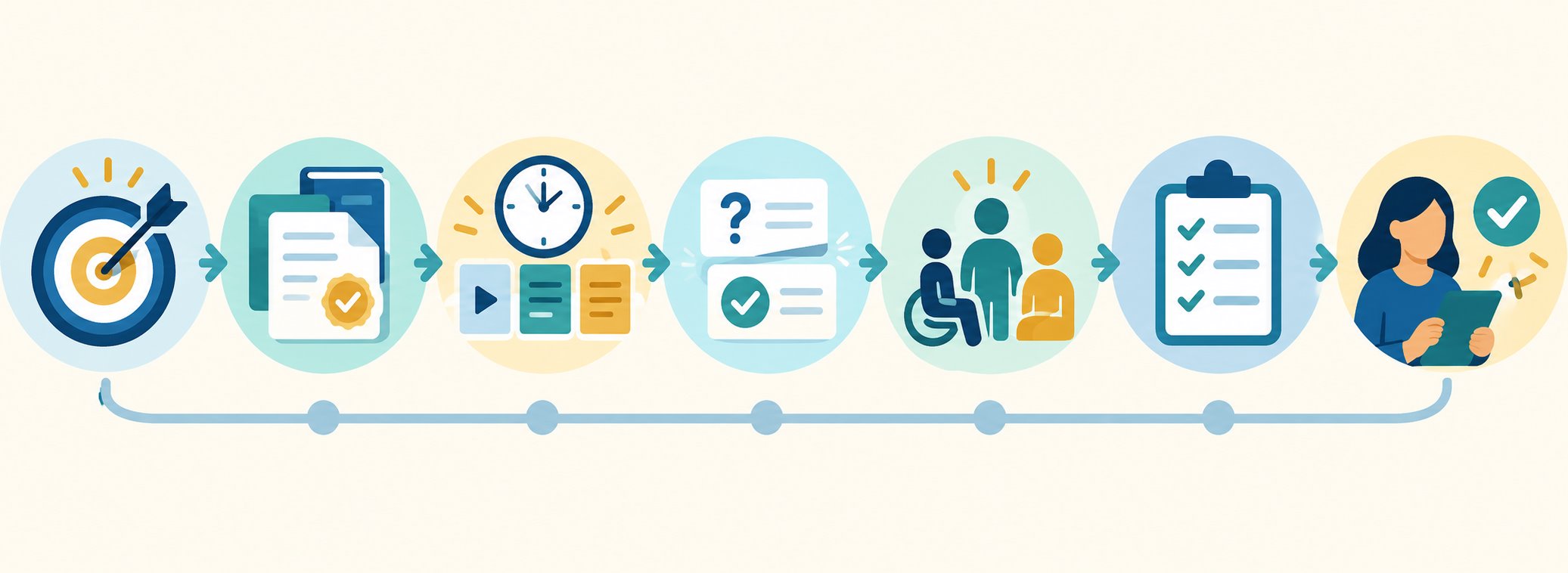
A Seven-Step AI Lesson-Planning Workflow
1. Start with the objective and success criteria
Give the AI one clear objective and ask it to draft two or three observable success criteria. Check that each criterion can be seen or assessed. Words such as “understand” can be difficult to measure, while “compare,” “solve,” “explain,” or “justify” point toward visible performance.
2. Provide trusted curriculum material
When your approved tool permits it, provide the relevant standard, syllabus wording, textbook extract, or teacher-created notes. Ask the system to use those materials rather than inventing curriculum details. Never upload copyrighted or confidential content unless you have permission and the platform is approved by your institution.
3. Request a timed lesson sequence
Ask for a draft containing an opening activity, explicit teaching or modeling, guided practice, independent or collaborative practice, checks for understanding, and a closing assessment. Require approximate timings that add up to the available lesson period.
4. Add checks for understanding
Do not wait until the final task to discover whether students followed the lesson. Ask for brief questions or actions at key points. Strong checks sample the whole class and reveal reasoning, rather than relying only on volunteers who already feel confident.
5. Plan access without lowering the goal
Ask for ways to make the same learning objective accessible through clearer instructions, vocabulary support, worked examples, visual representation, or alternative ways to respond. Review every suggestion against actual learner needs and any required accommodations. Avoid giving the AI names, diagnoses, behavior records, or other personal data.
6. Create the assessment and rubric
Request an exit ticket or short task that directly measures the stated objective. If you ask for a rubric, check that its criteria describe evidence in the student work and that the levels are genuinely distinct. An impressive-looking rubric is not useful if it rewards presentation while ignoring the intended learning.
7. Review, teach, and reflect
Read the complete plan as a teacher, not as an editor checking grammar. Confirm that the content is correct, the cognitive demand is appropriate, the transitions are realistic, and the materials are available. After teaching, note what worked and what needs revision. Those observations can inform the next draft without including identifiable student information.
A Reusable AI Lesson-Plan Prompt
The following prompt works as a starting template with many general AI assistants. Replace every bracketed item and remove sections that do not apply.
You are helping me draft a lesson plan. The final instructional decisions remain mine.
Grade/age: [level]
Subject and topic: [specific topic]
Lesson duration: [minutes]
Learning objective: [observable objective]
Prior knowledge: [what students already know]
Approved sources or standard: [paste or summarize permitted material]
Available resources: [materials and technology]
Learning needs to consider: [non-identifying information]
Assessment requirement: [how learning should be demonstrated]Create a timed sequence with an opening, teacher modeling, guided practice, student practice, checks for understanding, and an exit ticket. Explain how each stage supports the objective. Flag any factual or curriculum assumption that I should verify. Do not invent quotations, standards, sources, or student data.
Follow the first response with focused requests instead of asking for a complete rewrite each time. For example, ask for three alternative opening questions, a clearer worked example, or an exit ticket that better distinguishes partial from secure understanding.
Worked Example: A 45-Minute Science Lesson
Imagine a teacher planning a lesson on food chains for learners aged 10–11. The objective is: “Students will construct a food chain and explain how energy moves from one organism to another.”
A useful prompt
The teacher can provide the objective, explain that students already know the terms producer and consumer, list the organisms previously studied, and request a 45-minute plan using printed cards rather than personal devices. The teacher can also request two whole-class checks and a three-question exit ticket.
What the teacher should inspect
The resulting plan should use arrows consistently and explain what those arrows represent. The organisms must form scientifically plausible relationships. The exit ticket should test both construction and explanation, not merely ask students to copy a definition. If the tool invents a local species relationship or oversimplifies energy transfer, the teacher should correct it using an approved science source.
How to Evaluate an AI-Generated Lesson Plan
Use this checklist before turning a generated draft into classroom material:
- Alignment: Does every major activity support the stated objective?
- Accuracy: Have subject-specific facts, examples, answers, and citations been checked?
- Level: Are vocabulary and cognitive demand suitable for these learners?
- Timing: Is the plan realistic once instructions, questions, and transitions are included?
- Participation: Will all students think and respond, or only a confident few?
- Accessibility: Can learners access instructions and demonstrate learning in appropriate ways?
- Assessment: Does the final task measure the objective rather than an unrelated skill?
- Resources: Are all suggested materials available, safe, and permitted?
- Privacy: Does the plan avoid unnecessary personal or confidential information?
- Teacher voice: Does the lesson fit your teaching approach and classroom routines?
Privacy, Accuracy, and Responsible Use
Follow your school or institution’s approved-tool policy before using AI. Do not paste student names, contact information, grades, individual education records, medical information, safeguarding details, or identifiable behavior notes into a public AI service. An education-specific plan may offer different data protections, but local policy still applies.
AI outputs can contain errors, fabricated references, bias, or unsuitable assumptions. OpenAI’s educator guidance explicitly describes generated material as a starting point and emphasizes that teachers remain the experts. The same principle should guide use of any platform.
When a plan depends on a standard, quotation, historical claim, scientific explanation, or calculation, verify it in the original authoritative source. Keep a record of which materials you actually consulted.
Common Mistakes to Avoid
Using a vague one-line prompt
A broad request produces a generic lesson. Supply the objective, level, time, resources, prior knowledge, and assessment need.
Accepting the first draft unchanged
Generation is the beginning of planning, not the end. Question the sequence, replace weak examples, and edit language to fit your class.
Generating differentiation from sensitive profiles
Describe the instructional support required without identifying individual learners. Use professional knowledge and formal plans when deciding accommodations.
Confusing engagement with learning
A creative activity may be enjoyable but poorly aligned. Ask what students will think about, practise, and demonstrate during every stage.
Frequently Asked Questions
Can AI create a complete lesson plan?
It can create a structured draft, but a qualified teacher should verify the content, standards, assessment, accessibility, timing, and suitability before use. The teacher remains accountable for the lesson.
Which AI tool is best for lesson planning?
The best choice is an institution-approved tool that fits your workflow and data-protection requirements. ChatGPT, Gemini for Education, and Microsoft education tools all provide planning support, but access and features vary by account, region, and school licensing. If you are also evaluating student-facing options, see our guide to the best AI tools for students.
Should teachers upload student work to an AI tool?
Only when the institution has approved that exact use and the platform provides the required protections. Avoid identifiable student data by default, and follow applicable policy, consent, retention, and safeguarding requirements.
How do I stop AI lesson plans from feeling generic?
Provide a precise objective, prior knowledge, available resources, misconceptions, lesson time, and the kind of evidence you need. Then revise the response through small, focused follow-up prompts.
Do I need to disclose AI-assisted lesson planning?
Follow your institution’s policy. Even when disclosure is not required, keeping a simple record of the tool, purpose, and teacher revisions can support transparency and future review.
Conclusion
AI can reduce the friction of lesson planning by organizing ideas, proposing sequences, and drafting checks or resources. Its value depends on the quality of the context you provide and the care with which you review the output.
Begin with a clear objective, share only approved and non-sensitive information, request a structured draft, and verify every important instructional detail. When the teacher stays in control, AI becomes a practical planning assistant rather than an unreliable substitute for professional judgment.
For additional official guidance, review OpenAI’s educator prompts, Google for Education’s teaching prompts, and Microsoft’s AI lesson-planning guidance.